
Bonsai vs HoneyBook (2026): Pricing, Fees, Invoicing & Client Management Compared
Freelancers and small service businesses often need more than simple invoicing software. Many require tools for contracts, proposals, time tracking, payments, and client management all in one platform.
Two popular platforms designed for this workflow are Bonsai and HoneyBook.
Both tools combine financial management with project and client operations, but they approach freelancer workflows differently:
Bonsai focuses on an all-in-one freelancer operating system with contracts, invoicing, and accounting features.
HoneyBook emphasizes client experience, CRM functionality, and automated booking workflows.
This comparison breaks down pricing, invoicing capabilities, automation tools, payment processing, and ideal use cases to help freelancers choose the right platform in 2026.
If you're evaluating tools beyond Bonsai and HoneyBook, explore our guide to the best financial software for small businesses in 2025 to compare accounting, invoicing, and financial management platforms.
Quick Platform Comparison
| Feature | Bonsai | HoneyBook |
|---|---|---|
| Best For | Freelancers & solo consultants | Creative businesses & agencies |
| Pricing | Lower entry price | Higher but more automation |
| Contracts | Built-in templates | Available but simpler |
| Invoicing | Advanced invoicing | Simple invoicing |
| Client CRM | Basic | Strong CRM |
| Automation | Moderate | Advanced workflows |
| Payments | Stripe integration | Built-in payments |
If your business is scaling quickly, choosing the right financial system becomes critical. Our guide to financial software for scaling startups explains which tools support growing teams and advanced reporting.
Bonsai Overview
Bonsai is designed specifically for freelancers who want a single platform to manage the business side of their work. Instead of using multiple tools for contracts, invoicing, and proposals, Bonsai bundles these features into one system.
Key Features
Contract templates for freelancers
Automated invoicing and payment reminders
Proposal and client approval workflows
Time tracking and project management
Expense tracking
Tax reporting tools
For independent consultants, developers, and designers, Bonsai simplifies administrative tasks while keeping financial management centralized.
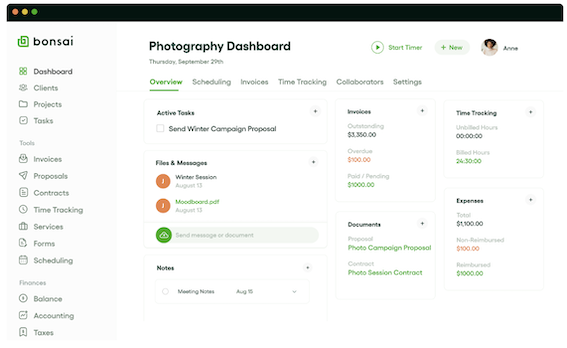
Bonsai’s photography dashboard lets freelancers manage clients, invoices, contracts, and projects in one place.
HoneyBook Overview
HoneyBook focuses more heavily on client management and workflow automation.
While it also includes invoicing and payments, the platform excels at organizing customer interactions and automating service business workflows.
Key Features
Client CRM pipeline
Automated onboarding workflows
Proposal creation
Scheduling and booking
Payment collection
Project communication tools
Creative businesses such as photographers, agencies, and event planners often prefer HoneyBook because of its client experience features.
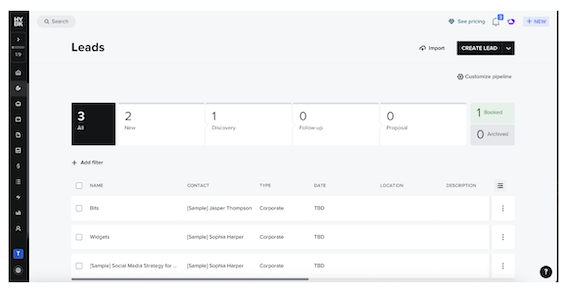
Example of HoneyBook’s CRM pipeline for managing leads, proposals, and client bookings.
Feature Comparison
| Feature | Bonsai | HoneyBook |
|---|---|---|
| Contract templates | Extensive | Limited |
| Proposals | Yes | Yes |
| Client CRM | Basic | Advanced |
| Scheduling | Limited | Built-in |
| Time tracking | Yes | No |
| Accounting tools | Basic bookkeeping | Limited |
| Workflow automation | Moderate | Advanced |
Pricing Comparison (2026)
| Plan | Bonsai | HoneyBook |
|---|---|---|
| Entry price | ~$24/month | ~$39/month |
| Free trial | Yes | Yes |
| Transaction fees | Payment processor fees apply | Payment processing fees apply |
| Best value plan | Professional tier | Unlimited plan |
While HoneyBook offers stronger automation, Bonsai tends to be more affordable for freelancers starting out. We also break down platform fees, payment processing costs, and total ownership in our financial software pricing comparison guide for 2025.
Real Cost Example
For example, a freelancer invoicing $5,000 per month may pay:
| Platform | Monthly Platform Fee | Estimated Processing Fees | Total |
|---|---|---|---|
| Bonsai | ~$24 | ~$145 | ~$169 |
| HoneyBook | ~$39 | ~$145 | ~$184 |
Actual costs depend on payment processors and transaction volume.
Best For
Choose Bonsai if you:
Work as a solo freelancer
Need contracts and invoices in one platform
Want integrated time tracking
Prefer lower monthly pricing
Choose HoneyBook if you:
Run a creative agency
Need strong client CRM
Want automated booking workflows
Manage multiple clients simultaneously
ScaleUp Tip
Bonsai is typically the better choice for independent freelancers who want financial tools and contracts in one place.
HoneyBook is stronger for service businesses that need client pipelines, automation, and CRM functionality.
Both platforms provide excellent ways to streamline freelancer operations, but the right choice depends on whether your priority is financial management or client workflow automation
FAQs
Is Bonsai cheaper than HoneyBook?
Yes, Bonsai generally has lower monthly pricing, making it attractive for freelancers just starting out.
Does HoneyBook include invoicing?
Yes, HoneyBook includes invoicing and payment collection tools alongside its client management features.
Which platform is better for freelancers?
Bonsai is often better for freelancers who need contracts, invoices, and tax tracking in one place.
Which platform is better for creative businesses?
HoneyBook is popular among photographers, designers, and event planners because of its client workflow automation.
